
Function · Hardware visualisation Built
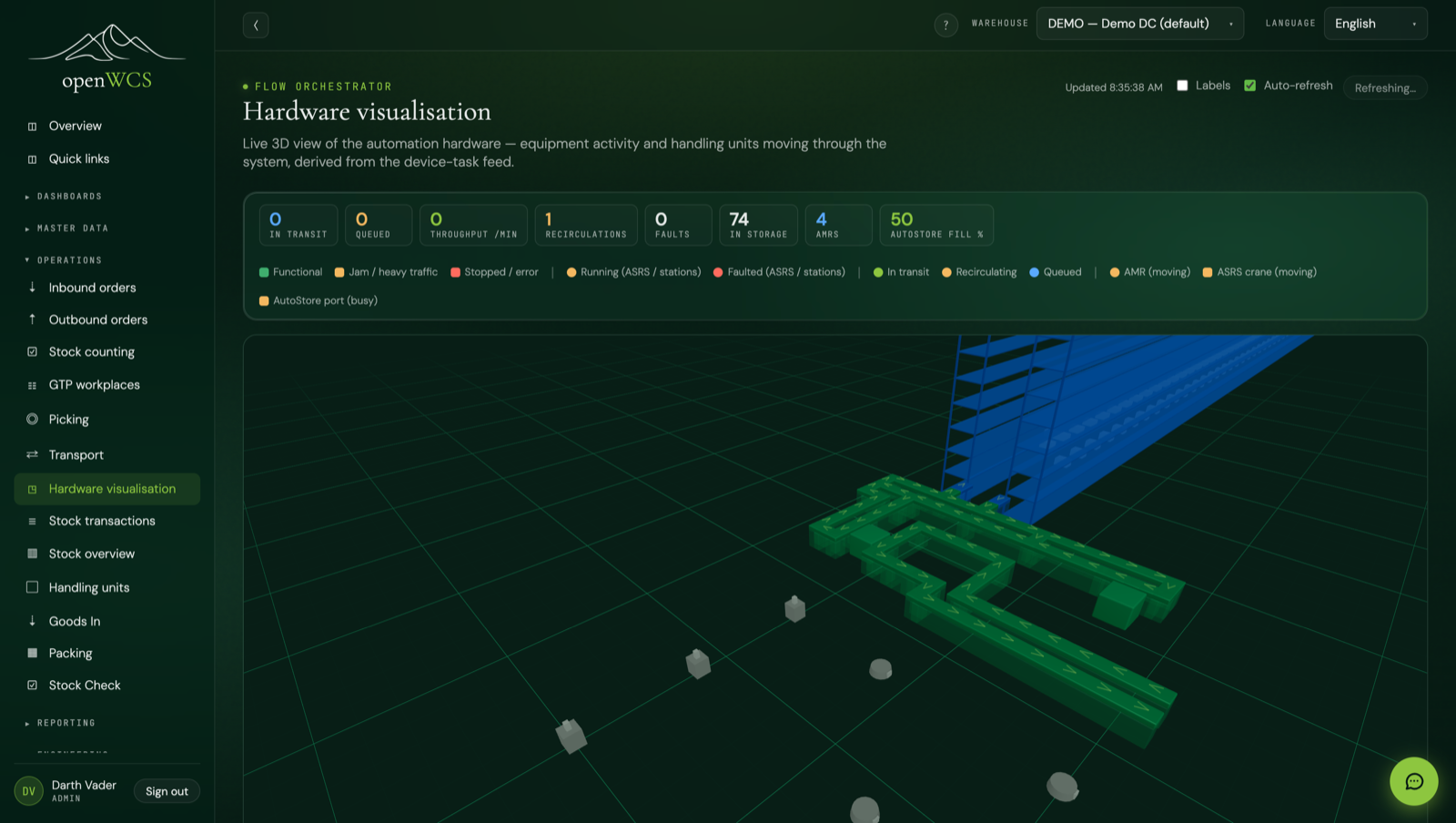
A live 3D digital twin of the warehouse, in the browser: the layout you drew, rendered with real-time equipment state, totes moving along the scan trail the floor actually reported, and storage fill down to the rack cell. Built today, in the open-source UI.
✓ Built: the live 3D digital twin ships today in the openWCS UI, with live AMR fleet, AutoStore grid views, and ASRS cranes that glide and lift in the rack with metre-exact per-frame motion.
Built today
Most control systems give you a table of fault codes. openWCS renders the whole estate as a 3D model and animates it with what the hardware is really doing, right now.
Every placed conveyor, ASRS, sorter and station is coloured by its live state: idle, running with an amber pulse, faulted in red. Click any machine to see the device tasks behind its state.
Handling units glide smoothly along the real conveyor geometry, interpolated between the scans the floor actually reported; nothing is invented. Click a tote for its full transport trace, recirculation loops included.
Stored totes appear in the ASRS rack at their exact cell positions, so you can watch aisles fill and drain as put-away and retrieval run. A level selector handles multi-floor layouts.
A live stats bar tracks in-transit and queued units, throughput per minute, recirculations and faults, with auto-refresh and a labels toggle to declutter the view.
The twin reuses the topology editor's 3D scene read-only: the same geometry, levels and equipment you laid out become the live picture. No second model to maintain.
Everything is derived in the browser from the device-task feed the adapters already produce, plus the saved layout. No extra server, no message bridge, no per-seat visualisation license.
The twin renders a live AMR fleet, robots coloured by status and showing the handling unit they carry, alongside AutoStore ports marked busy or idle and a grid fill % stat. It is fed by emulator telemetry (fleet and grid feeds) mapped through the twin endpoints, so a full automated floor moves on screen with no hardware.
The foundations
The twin sits on the same layout and emulation stack the rest of openWCS runs on.
Admins lay out conveyors, ASRS, sorters and stations across levels in a visual 2D/3D editor; the routing graph is generated from the physical placement.
Topology learned from sniffed scan traffic surfaces in the same editor as a proposal to accept or diff — visualising what the hardware is actually doing.
An admin toggle puts every device adapter (conveyors, ASRS, AMR, AutoStore) into emulator mode: it simulates the machines and emits synthetic telemetry. Flip it on and the twin shows a full warehouse running with zero hardware.
On the roadmap
The twin keeps gaining fidelity: each refinement that comes online appears in the same live picture.
Totes, AMR robots and ASRS cranes are interpolated per frame so they glide and lift continuously between polls instead of snapping, including live crane position and lift inside the aisle.
At a glance
  2D/3D topology editor  (draw · learned overlay)                  (built)
        │  saved layout + live device tasks
        ▼
  live 3D digital twin  ── equipment state · moving totes · rack fill
                         · AMR fleet · AutoStore ports & grid fill
                         · ASRS cranes (glide & lift, per-frame motion)   (built)
See it yourself
The twin ships in the open-source UI today. Open the live demo, switch on the emulated floor, and watch it move.